
Why was your DoorDash photo rejected?
DoorDash emails you the reason, which is one of eleven it publishes. Fix that one problem, then upload the updated photo to the item in Menu Manager, which sends it back for review. The reasons that catch most people are size (minimum 1400 x 800), zoom (at least 80 percent of the item visible) and framing (landscape 16:9 only).
At a glance
- Shape
- 16:9 landscape
- Minimum size
- 1400 × 800 px
- Max file size
- 16 MB
- Formats
- JPG or PNG
From DoorDash's own page, read .

Su Lee · Founder, MenuPhotoLab
6 min read · Sources last read · 4 sources
On this page · 7 sections
Read in another language
Will your photo pass DoorDash?
Check its size, shape and file type against DoorDash’s published rules in a few seconds. The photo stays on your device and nothing is uploaded.
Drop a photo here, or choose one from your phone or computer.
How do I fix a rejected DoorDash photo?
Read the reason
DoorDash emails you when a photo is rejected, and opening the item in Menu Manager shows the same reason.
Fix that one problem in the photo itself
The table below says what each of the eleven reasons means and what to change.
Upload the updated photo to the same item in Menu Manager
DoorDash sends it back for review.
Leave approved photos alone
DoorDash's own guidance is not to re-upload photos that are already approved.
Those steps are DoorDash's own, from its help page on rejected photos, read 2026-09-16. If you think a photo was rejected by mistake, you do not have to change it first: the rejection notice in Menu Manager carries a Request review control, shown in the screenshot further down this page.
All eleven reasons, and what to do about each
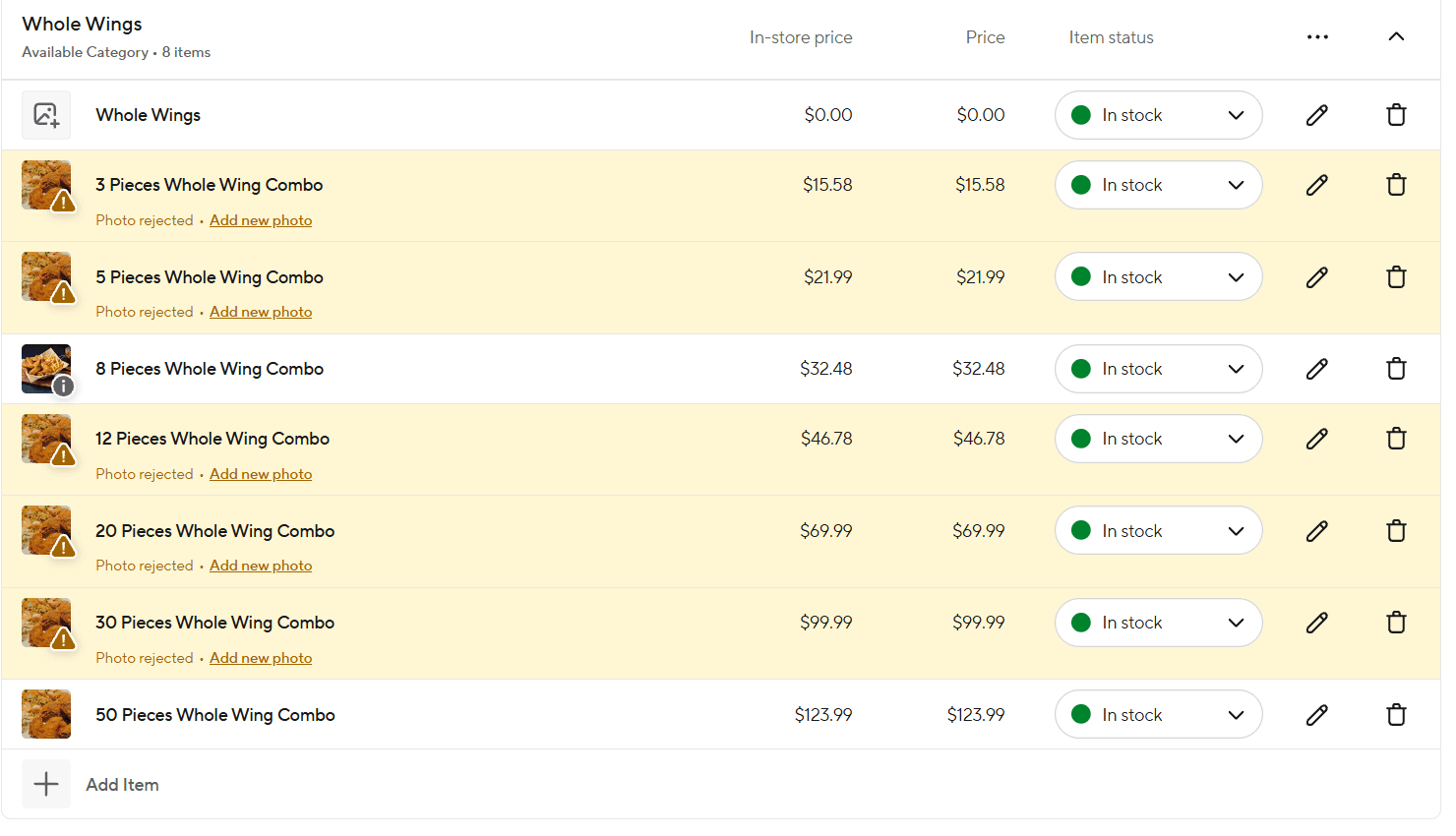
The left column is DoorDash's own wording from their rejection reasons page. The middle column is the rule they attach to it. The right column is what actually fixes it.
| DoorDash's reason | Their stated rule | The fix |
|---|---|---|
| Photo is the wrong size or resolution | Minimum 1400 x 800 px | Reshoot or re-export larger. Do not upscale a small photo, it stays soft and can fail focus instead |
| Photo is too zoomed in or out | At least 80% of the item must be visible | Step back. This is the most common cause of a second rejection after fixing the first |
| There is an issue with the framing | Landscape 16:9 only | Crop to 16:9. A phone shoots 4:3 by default, so this needs doing every time |
| Poor lighting | Bright, even light. No harsh shadows, no blown highlights | Shoot near a window, turn the overhead light off. Restaurant ceiling light is the usual culprit |
| There is an issue with the background | Simple, non-distracting. Item fills 50-70% of the frame | Clear the table. See the note below about the 50-70% figure |
| Photo includes overlays, borders, or watermarks | Photos must be clean and unedited | Remove price stamps, logos and text. Export a clean file |
| There are people in the photo | No people visible. Hands allowed only if they do not obscure the item | No faces, no staff in shot. Hands are permitted when out of focus, off to the side and secondary to the dish |
| Photo is not representative of the item | Photo must show exactly what is included | Shoot the actual dish as it ships. A combo photo cannot stand in for the single item |
| Photo is out of focus | Sharp, clear, in focus | Tap to focus on the dish before shooting. Check at full size, not on the phone preview |
| There are copyright issues | Original images you own the rights to | No stock, no supplier photos, nothing pulled from the web |
| There are duplicate photos | Each unique item needs its own photo | The common trap is size variants. A 10-piece and a 20-piece need different photos |
Why do size variants keep getting rejected?
Because DoorDash treats every piece count as its own menu item, and every menu item needs its own photo. A 10-piece and a 20-piece cannot share one image. Reusing the photo you already have across the smaller and larger counts is the single most common way to collect a run of rejections in one afternoon.
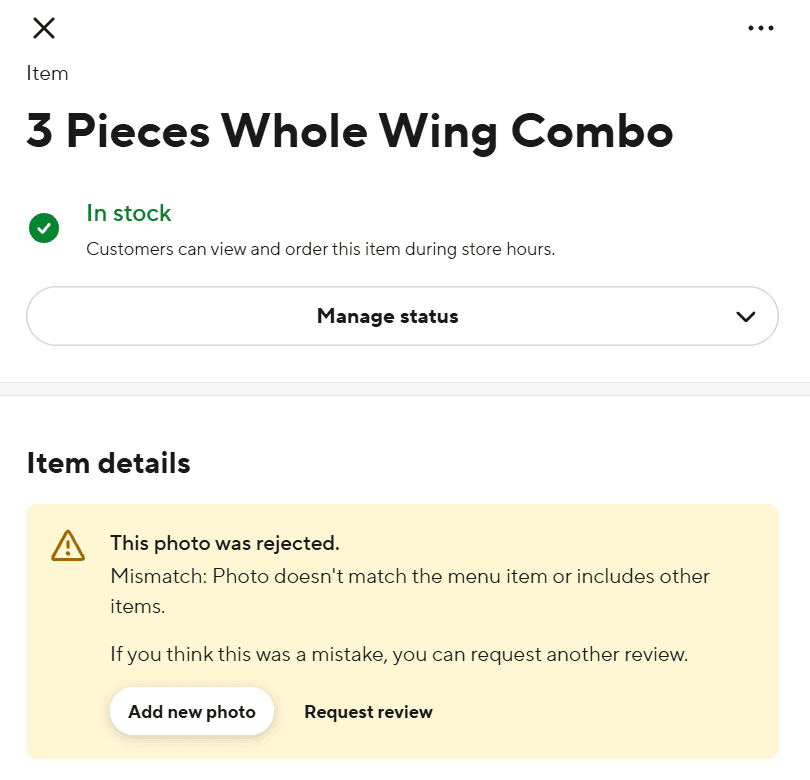
The wording in the merchant portal is not the wording on the rejection reasons page. Their documentation calls this duplicate photos. What Menu Manager actually shows you is "Mismatch: Photo doesn't match the menu item or includes other items." Same rule, two different sentences, and the one you will search for is the one on your screen.
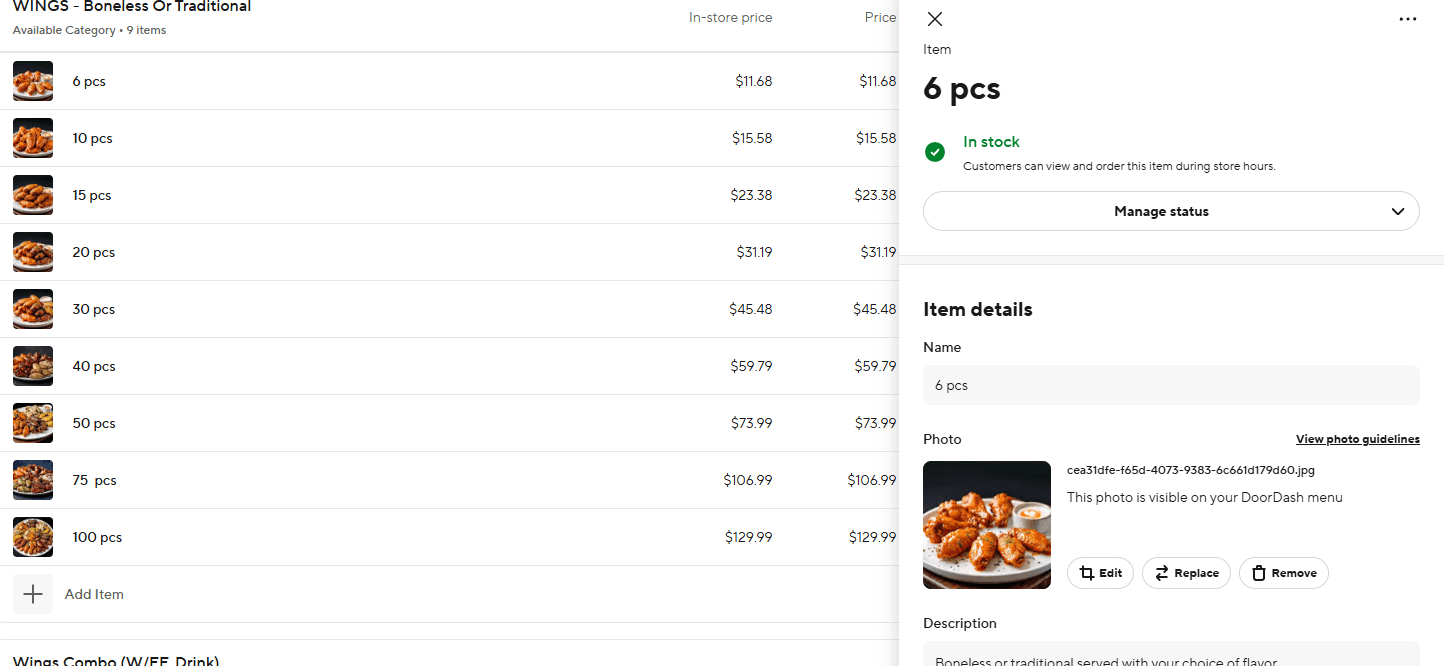
The three that catch most people
Size
1400 x 800 is the floor, not the target. Shoot at whatever your phone gives you and scale down, rather than shooting small and scaling up. Upscaling a small photo trades a size rejection for a focus rejection.
Zoom
At least 80 percent of the item has to be visible. Close-up food photography is a habit worth breaking here, because a tight crop that looks great on Instagram fails this rule outright.
Framing
Landscape 16:9 only. Your phone almost certainly shot 4:3, so every photo needs a crop before it goes up. This is also the rule that collides with the other platforms, since Uber Eats wants 5:4 to 6:4 and Grubhub wants a square.
The frame-fill rule contradicts DoorDash's own thumbnail
DoorDash asks that the item fill 50 to 70 percent of the frame. Separately, their glossary states that menu thumbnails appear as a centered square.
Those two rules do not quite agree, and the arithmetic is simple. A centered square cut from a 16:9 frame keeps only its height, which is nine sixteenths of the width, so 56.25 percent of the width survives into the thumbnail.
| Item fills | It spans | Square thumbnail keeps 21.9% to 78.1% | Result |
|---|---|---|---|
| 50% of the width | 25% to 75% | inside | Survives |
| 56% of the width | 22% to 78% | just inside | Break-even |
| 60% of the width | 20% to 80% | outside | Clipped in the thumbnail |
| 70% of the width | 15% to 85% | well outside | Clipped in the thumbnail |
What DoorDash does not tell you
Three gaps worth knowing, because the absence is easy to mistake for something you missed.
The appeal exists, but only inside the product
Nothing in DoorDash's own help documentation describes a way to contest a rejection. The button is there anyway: open a rejected item in Menu Manager and the rejection notice ends with "If you think this was a mistake, you can request another review", next to a Request review control. I could not confirm this from their documentation on 2026-08-27 and said so on this page. It is confirmed now, from the merchant portal itself, and the screenshot is below.
There is no published review time
Nothing on the rejection page states how long review takes.
Their file size numbers disagree with each other
The rejection reasons page states a 2 MB maximum. Their specification page lists 2 MB and then says item photos have a higher limit of 16 MB. Stay under 2 MB and the disagreement stops mattering.
Frequently asked questions
Why was my DoorDash menu photo rejected?
DoorDash publishes eleven reasons: wrong size or resolution, too zoomed in or out, framing or aspect ratio, poor lighting, background problems, overlays or watermarks, people in the photo, not representative of the item, out of focus, copyright, and duplicates. The rejection email names which one applied.
Can I appeal a rejected DoorDash photo?
Yes, though DoorDash's help documentation does not say so. Open the rejected item in Menu Manager and the rejection notice carries a Request review control, with the wording "If you think this was a mistake, you can request another review". Verified in the merchant portal on 2026-08-30. DoorDash publishes no time limit or expected turnaround for it, so if the rejection reason is one you agree with, fixing the photo and re-uploading is still the faster route.
Why do my size variants keep getting rejected as duplicates?
Because DoorDash requires each unique menu item to have its own photo, and piece-count variants count as separate items. A 10-piece and a 20-piece cannot share one image. Their documentation files this under duplicate photos, but Menu Manager words it differently: "Mismatch: Photo doesn't match the menu item or includes other items." Either shoot each count or accept that the smaller variants stay without photos.
Can hands be in a DoorDash menu photo?
On DoorDash, yes, with conditions. Their rule is no people visible in menu photos, but their own page allows hands when they are out of focus, off to the side, and do not distract from or obscure the item. Utensils in action are fine if the hand is not visible. Grubhub is stricter and prohibits body parts outright, so the same photo can pass one platform and fail the other.
Real client work
A real restaurant's takeout photo, now live on DoorDash
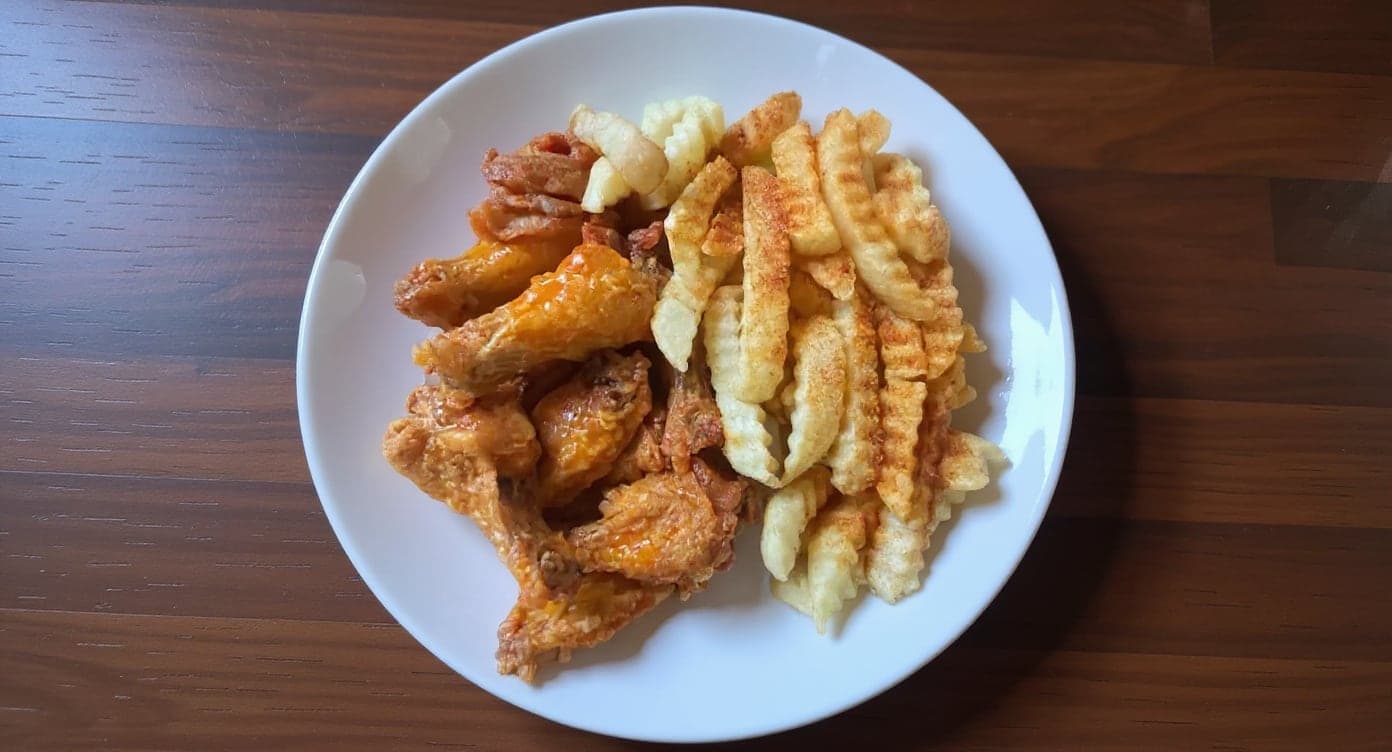
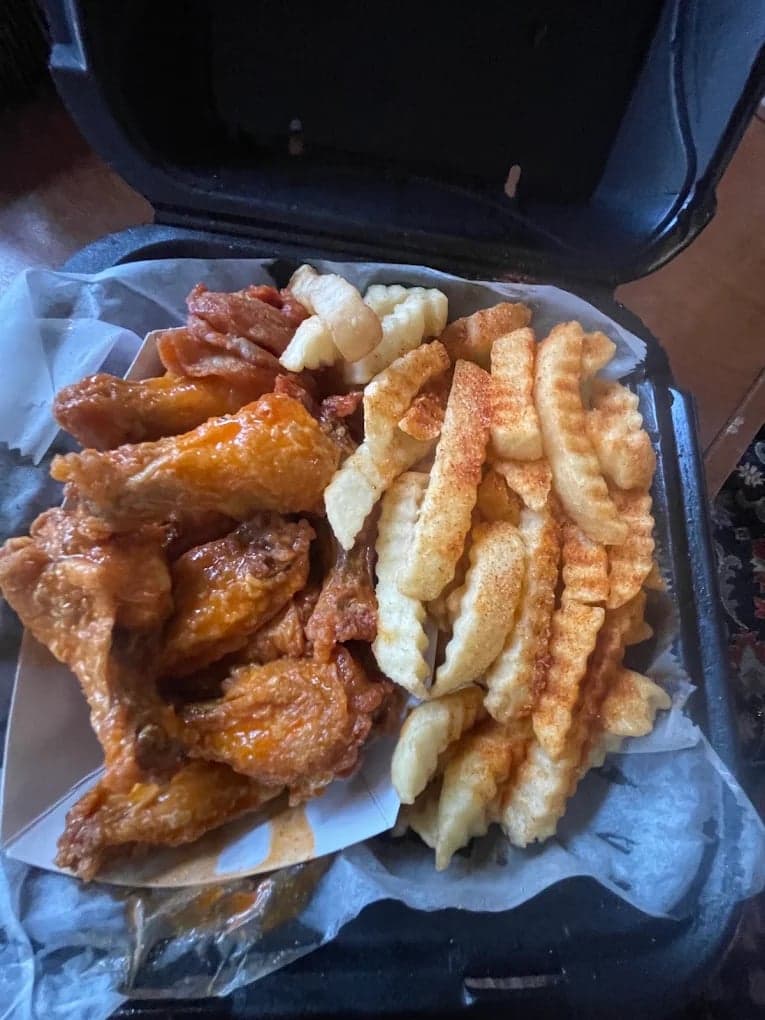
We hadn't updated our photos in three years. This finally got our DoorDash listing looking current.
5 photos free · No credit card · No watermark
Keep reading
- What are DoorDash's menu photo requirements?DoorDash
- Will AI-generated photos get your menu rejected?All platforms
- What are Uber Eats' menu photo requirements?Uber Eats
- Your menu photo was rejected. How do you find out why?Rejections
- Why do my restaurant food photos look dark and yellow?Lighting
- How many menu photos does a wing shop need on DoorDash and Uber Eats?Wing and Philly shops

Su Lee
Founder, MenuPhotoLab · Atlanta, Georgia
I have photographed Atlanta restaurants for six years as a food creator, and for the last two my sister and I have run SocialLee Agency, shooting and uploading menus for independent restaurants around metro Atlanta.
Sources (4, each with the date it was read)
- DoorDash, Common reasons for rejected menu photos, read
- DoorDash, Why your menu photos were rejected and how to fix them, read
- DoorDash, Menu photo terms glossary (thumbnails render as a centered square), read
- DoorDash Merchant Portal, Menu Manager (screenshots on this page: the rejected-item list, the Request review control, and the compliant wings category after the fix, captured from a live store and published with the merchant's permission), read
Platform requirements change. This page carries the date each source was last checked.
Not affiliated with DoorDash, Uber Eats, Grubhub, Google.